All programmers suffer from analysis paralysis at some point in their career. The trick is bringing it to a swift conclusion. Try this to move forward next time. Give yourself 1 pomorodi (25 minutes) to analyze the problem. After that make a decision and go with it. Whatever falls out is whatever falls out. At least you were not over-analyzing the problem and getting nowhere.
Programming
DSLR Lightning Trigger 2
Lightning Drought
Back in September, I created a simple Arduino-based lightning trigger (original article). I’ve been waiting since then for the chance to test the circuit in the field. Yesterday provided the first real chance to test the circuit; unfortunately, I missed it.
Improving the Program
Even though I missed the event, I did decide to improve the program a little. The major change, if it can be called major, addresses a weakness in the original program. Originally, every event would attempt to trigger the shutter twice (once when the lightning occured and again when the brightness returned to normal). To fix this I am removing the absolute value function from the brightness test. Now, it will only trigger if the new brightness is brighter than the previous.
#include <multiCameraIrControl.h>
int shutterPin = 13;
int triggerPin = 0;
int threshold = 10;
int savedLightningValue = 0;
int currentLightningValue = 0;
int delayBetweenShots = 1000;
Nikon shutter(shutterPin);
void setup() {
Serial.begin(9600);
pinMode(shutterPin, OUTPUT);
digitalWrite(shutterPin, LOW);
savedLightningValue = currentLightningValue = analogRead(triggerPin);
}
void loop() {
currentLightningValue = analogRead(triggerPin);
Serial.println(savedLightningValue, DEC);
if((currentLightningValue - savedLightningValue) > threshold) {
Serial.println("Triggering shutter");
shutter.shutterNow();
delay(delayBetweenShots);
}
savedLightningValue = currentLightningValue;
}
Resources:
- https://github.com/chaddotson/arduino-lightning-trigger – Repository on GitHub
Other Posts in this series:
Becoming an Entrepreneur as a Software Engineer Vol 2
This is part two of my discussion and thoughts on seeking to become an entrepreneur as a software engineer. These are my current thoughts on the process and how to achieve my overall goals in becoming an entrepreneur. This entry centers on the belief that becoming an entrepreneur occurs in several distinct phases. Currently, I have identified three core stages. During each of these phases our rolls and responsibilities change and grow drastically.
Stage 1: Working for someone else
This stage is the simple “do work” stage. We work to fulfill someone elses vision, we work to complete their goals and bring life to their ideas. We work to solve their problems. Since we are, at our core, this state is the default for most workers in industry.
Stage 2: Startup
This stage where we work to get our company off the ground. We are working to fulfill our own vision. We have identified a product or service area and are actively working to produce something. We may or may not have a small team but at worst case we are the pitchman, sales rep, accountant, architect and coder all in one. We are still the problem solvers, just with more hats to wear.
Stage 3: Liftoff
In the other stages we still participated in the day to day work being done, in this one we have progressed to something else. What that may be is up to the structure of the company. We have at the very least transitioned from problem solver at the code level to problem solver at the company level. We are actively deciding the direction of our company and product. We transitioned to a form of problem creator for the people in our company.
On Software Engineering
Spring
Writing from the patio on a much deserved day off. What a day, sunny and 68 this 3rd day of spring. It sometimes makes it real hard to work inside in a windowless box. It’s been a busy day of a different sort, but dang I could get used to it.
Software Engineering Is Consuming
Software Engineering can and is absolutely consuming work. The short of it is, we like what we do so we tend to focus a lot of attention on it. We are problem solvers, designers, learners, and the list goes on. I am of the philosophy that you should find and do something you like because anything else is a waste. I guess that philosophy has its pros and its cons. Is it so bad when your day consists of writing code, solving problems, researching, and learning new things?
Achieving Balance
I guess everyone talks about work/life balance and its true; you must always take time for yourself. Get outside, do some walking. It will help clear your head and it is a good stress reliever. Maybe you’ll come back to the task with some fresh ideas and renewed vigor. The schedule will always be there.
Personally as of April, I will have been on a diet and exercise plan for 2 years. I’ve lost a lot and still need to lose more. One of my biggest problems has been shorting myself on time to maintain my walking and weight lifting. I seem to always get wrapped up in something.
Having a rewarding hobby is probably a good idea. I’m not talking about coding a side project (don’t we all seem to have an overabundance of those), I’m talking about something else entirely. My non-programming hobby is photography. I don’t get to do it much it seems anymore it seems, but I do find winter a dreary time to take photos. I did have a major accomplishment in this area last fall. I officially photographed a wedding. While I was originally scared to take on such a task, the photos turned out wonderfully. I took the photo below today.

A Better AsyncTestCase for Python
If you need asynchronous support in python unit tests, there are a few possibilities. A simple google search points you to a few packages, one being tornado. Tornado’s tornado.testing.AsyncTestCase seems straight-forward. However it does have a shortcoming: it’s not thread-safe. Trying to use it with a thread will result in a sporadic exception. Consider this thread-safe, functionally similar alternative.
from threading import Event
from unittest import TestCase
class TimeoutError(Exception):
pass
class AsyncTestCase(TestCase):
""" Provides functionality similar to tornado.testing.AsyncTestCase except is thread-safe.
"""
def __init__(self):
self._done = Event()
def setUp(self):
super(AsyncTestCase, self).setUp()
self._done.clear()
def tearDown(self):
super(AsyncTestCase, self).tearDown()
self._done.clear()
def wait(self, timeout=None):
""" Wait for event to be set. Raise an exception if the event isn't set by the timeout.
"""
if timeout is None:
timeout = get_async_test_timeout()
self._done.wait(timeout)
if not self.is_done():
raise TimeoutError()
def stop(self):
""" Set the event to terminate wait.
"""
self._done.set()
def is_done(self):
return self._done.isSet()
# taken from tornado.
def get_async_test_timeout(default=5):
"""Get the global timeout setting for async tests.
Returns a float, the timeout in seconds.
"""
try:
return float(os.environ.get('ASYNC_TEST_TIMEOUT'))
except (ValueError, TypeError):
return default
Node.js vs Python vs PyPy – A Simple Performance Comparison – Updated


Some History
This is a followup to my original post: Node.js vs Python vs PyPy – A Simple Performance Comparison. This article corrects a discrepancy caused by a slight difference in the JavaScript implementation which skewed the Node.js results.
The Algorithm
As stated in the previous article, I’ve attempted to implement the same single-thread, brute force, recursive algorithm in many different languages. There is nothing overly special about this algorithm and I’ve made no attempts to optimize it.
The Findings
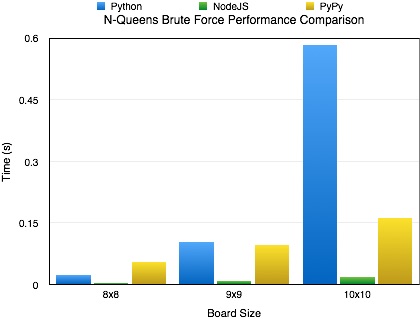
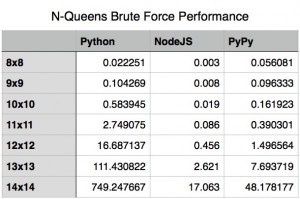
Node is fast, very fast. It easily outperforms any of the other implementations I’ve included in the puzzle’s repository. As you can see by the included charts, the performance difference between Node.js and out-of-the-box Python is very significant and the difference between it and PyPy while less pronounced is significant.
Special Notes
- I’ve placed my source on GitHub at the following url: https://github.com/chaddotson/puzzles. It now contains functional N-Queens puzzle implementations in JavaScript, Python, Lua, Scala, and Ruby. There is also a version in Rust, but that needs to be updated to the latest syntax before it can be run again.
- This is just with one type of algorithm, the best solution might and probably does change depending on what type of application you are researching. For webserver performance, Node.js is slightly better than PyPy running Tornado.
- This algorithm is a simple brute force algorithm, there are many faster and better ones out there.
- See the original article for the Node.js vs Python vs PyPy – A Simple Performance Comparison for more details memory performance.
Notes On Writing Testable JavaScript Vol 1
When writing JavaScript, I am a big fan of minimizing functionality and variables exposed publicly, which we all know to be good practice. However, this leads to anonymous functions and functions hidden within closures. So….
How Do You Test That?
How exactly do you test private methods in JavaScript? To answer that you should ask yourself, should I even be testing them independently or can I write tests for the exposed functionality and still achieve code coverage? If the answer to that question is “yes,” write tests for the exposed functionality that inherently test the underlying private functions and stop there. If the answer is “no, I really need to test this function.” There are a few approaches.
Member Variables For Testing Only
This approach involves creating member variables intended for testing and testing alone. This method relies on the build process to remove the variables before going to production. While this process works, I believe it has a code smell to it. You are polluting and bloating the code base with needless variables. If you are interested in the approach, here is an article about it.
The Real Question: Should It Be There?
Is the fact that you are asking this question an indicator of a code design issue? Perhaps the code is in violation of the Single Responsibility Principle? I’ve recently experienced a little epiphany associated with this. I realized that a collection of private functions that I was hiding actually belonged to a separate object as public functions. This refactoring drastically reduced the code complexity, made it more maintainable, and enabled small, important functions to be separately tested.
Make It Easy
Building a successful product is usually complicated business. With any luck a project will have an automated deployment process. This however is only part of the equation. Another significant part would be an automated build process.
Long Term Success
Long term success means making it easy for new people to get started in the weeks/months/years following a project’s startup. Imagine the following project in two different scenarios.
The project is a large scale application with several dependencies.
Scenario 1 (No automated configuration and build process):
- Check out project from source control.
- Perform configuration needed for dependencies.
- Build / Install each dependency separately.
- Perform configuration needed for product build.
- Build product.
Scenario 2:
- Check out project from source control.
- Build product.
Which of those scenarios is more straight-forward and easiest to work with? It’s pretty easy to see that scenario 2 is the best.
Memory and Documentation
In addition to helping new team members get started, automated builds can serve as a form of long term memory.
“How do I do that?” becomes “press build.”
“How does that work?” becomes “check the build script.”