Technology

Python Logger

The Scenario

This scenario illustrates two possible mistakes people make when using the python logging module.  Analyze the following code and look for issues.

try:
    ...
except SomeException as e:
    logger.error("Some meaningful error message. message={0}".format(e.message))

So what is wrong with that?

First and foremost, the code fails to use the existing Logging.exception function that could and in most cases should be used when logging exceptions.  That function will automatically add all the exception info to the log, meaning that you will have the stack trace!  Secondly, this sample used the string.format function to format the log message for the logging library when the logging library can in fact handle string formatting itself via old style format specifiers.

Fixing it

If I were to ignore the first problem, the following code is what I should have written.  The benefit here is that the formatting is only executed if the log message is to be captured, unlike the first method.

try:
    ...
except SomeException as e:
    logger.error("Some meaningful error message. message=%s", e.message)

Taking both errors into account, we should have used the exception function instead of the error function on the logger as well as the built in formatting.  Given both of these, the code becomes.

try:
    ...
except SomeException as e:
    logger.exception("Some meaningful error message")

More Data

This scenario led me to quantifying the error in execution time.  The first set of data is related to logging alone; the second set extends to timing the different string formatting options.  As you can see by the data, using the format is a good bit slower than the built-in “old-style” formatting in the logging package.  While it will add up, it isn’t a world ending difference if done on a small scale.  Again, the time difference is largely due to the fact that no formatting takes place unless the message has a high enough level.  This data caused me to extend my study into timing the two different formatting options.  As you can see by the data, the “old style” is marginally slower than the format style.
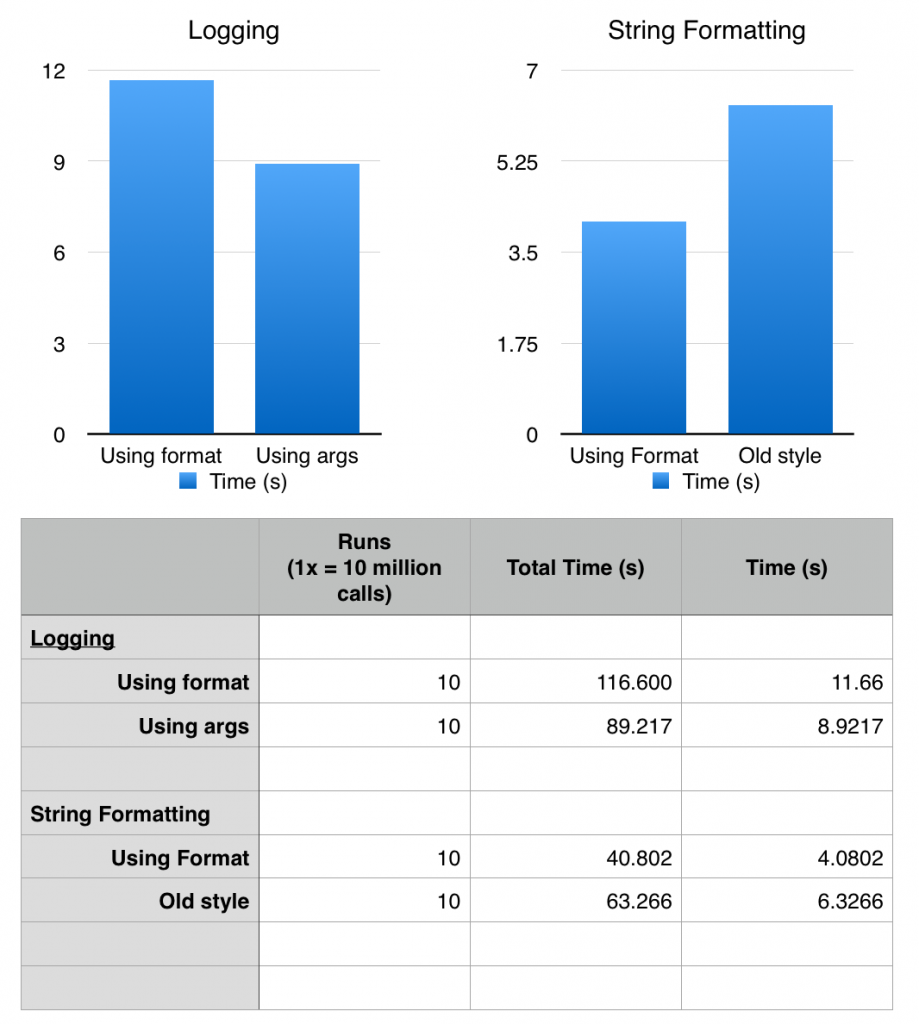
Comparing old style to new style string formatting


In the end

You should use functionality the API gives you.  In most cases, and the case with python, it has been engineered to work, be fast and be maintainable.  For more information on the logging module, check the python docs.  2.7 or 3.5.

Posted by Chad Dotson in Doing Things Better, Programming, Software Engineering, Technology, Tips, 0 comments

PyCharm and Version Control

So, you want to add your PyCharm project files to a VCS but you constantly deal with problems because each of your team members have different names/locations for their project interpreter.  There is a rather simple solution to this problem.  Basically, at the project level, PyCharm only cares about the name of the interpreter, not the location.  Follow these instructions to give your interpreter a name that is consistent across developers and then use that in your project files to fix the issue.

    1. Open PyCharm
    2. Select File >> Settings (or Configure >> Preferences if you don’t have a project open).
    3. Search for the Project Interpreter setting (this will also work if you don’t use the project interpreter in your run configurations).
    4. Hit the little gear box next to the project interpreter then select More.
    5. Select the interpreter from the virtual environment of your choice and hit the edit button.
    6. Now give it a unique name (preferably identifiable and related to your project.
    7. Now, select that unique name as your default project interpreter or your run configurations.
    8. Commit
    9. Make sure each team member does the same.

Now whenever you update or commit, you won’t constantly see changes associated with people selecting their interpreter.

If you want to know more, I definitely recommend reading a thread over at Jetbrains’ Support.

Posted by Chad Dotson in Doing Things Better, Programming, Software Engineering, Tips, 0 comments

DLSR Lightning Trigger 4

Success again!  This time the lightning trigger managed to capture a good bolt (though not as photogenic as I would have liked).  I ran into trouble again with my camera exiting the “Quick-response remote” release mode.  This caused me to miss more than a few events, but I did find the solution.  Buried in one of the custom settings is a timeout for the remote feature.  It defaults to 1 minute!  I’ve now set it at the max of 15 minutes.  Maybe this has worked some of the kinks out and the next storm will produce some good lightning opportunities.

Posted by Chad Dotson in Hobbies, Photography, Programming, Technology, 0 comments

Not Invented Here, Not Written By Me, and Reinventing The Wheel

Not invented here and not written by me are both driving factors in reinventing the wheel when developing software.

We limit ourselves if we do not build upon the achievements of others. – Chad Dotson

Not Invented Here

I’m sure everyone has encountered developers that would prefer to implement everything themselves instead of using a library.  An example would be not using jQuery or underscore (or comparable libraries) on a web project.

This is a serious problem for several reasons.

  • It needlessly increases development time.
  • It potentially leads to less robust code and/or increased testing time.
  • It potentially leads to less maintainable code.

I’m not saying that libraries should always be preferred over your own code, but they should be strongly considered.  If you choose to re-implement what a library gives you, you should prepare some defensible reasons for not going with the library.

More: Wikipedia

Not Written by Me

This is a more refined, narrower case of Not Invented Here.  Those developers who don’t want to spend the time or have difficulty understanding code written by others often reimplement code because they view it as the simpler solution.  This is a falsity and they hurt their overall code quality and momentum for it.

Some common things you will hear are:

  • I don’t know what that code does.
  • I would spend a shorter amount of time rewriting it.  (Which is most likely a falsehood.)

The Core of the Issue

As I’ve said, I think the core of the issue is that we find it harder to understand what someone else writes vs what we write ourselves.  We must apply programming best practices and resist the urge to reimplement the past.  To grow, we must push past our tendencies and continue to move forward to bigger and better things.

Posted by Chad Dotson in Doing Things Better, Key Concepts, Programming, Software Engineering, 0 comments

C-Style Unions And Python

So, you’re creating a C Union (used to create a variant type) and writing it to a file, socket, etc and want to read that in Python. There are two ways to deal with this.

Assume the following union definition in C

typedef union {
    int i;
    unsigned int u;
    float f;
} data_t;

In C, reading the value represented by this is easy.  Since its 4 bytes, you simply read 4 bytes and then reference the appropriate element.  In Python, if your looking for functionality to closely match C, it seems not so straight forward.

struct.pack and struct.unpack

The first thing you try to do is look at the struct module and see if pack and unpack can come close to doing what you want.  The problem with pack and unpack is that it requires a data type.

from struct import unpack

# byte_buffer -> binary input
# var_type -> variable type indicator

unpack_code = ''

if var_type == 'INT':
    unpack_code = 'i'
elif var_type == 'UINT':
    unpack_code = 'I'
elif var_type == 'FLOAT'
    unpack_code = 'f'

var = unpack(unpack_code, byte_buffer)[0]

This works just as well as anything and is completely straightforward, the big problem here is speed.  First, we have to do an if around each call to unpack to get the appropriate option.  Second, its faster to pull in arrays in python than single values.

A ctypes addition to struct.pack and struct.unpack

Using ctypes, you can approach a functionality similar C.  Take the following code for example.

from ctypes import c_int, c_uint, c_float, Union
from struct import unpack

class MyType(Union):
    _fields_ = [("i", c_int), ("u", c_uint), ("f", c_float)]

var = MyType()

var.i = unpack("i", byte_buffer)[0]

# then var.i, var.u, var.f contain the integer, unsigned int, and float representations respectively.

Notice that it is always unpacking the data as an integer into the integer part of the union.  This approach has a few advantages.  One, it functions the same as the C version of the code would.  Two, you can unpack entire arrays at once which can be faster.

Conclusions

The first code sample seems to be the simplest and most straightforward though potentially slower.  However, depending on the situation, you may want an implementation similar to the second.

Posted by Chad Dotson in Programming, 0 comments

DSLR Lightning Trigger 3

DSC_0539

Finally Some Lightning … IT WORKS!

Tonight, I was finally able to deploy the prototype of my lightning trigger.  The storm wasn’t particularly photogenic, but it at least helped prove the concept.  Lightning was slim and no bolts were in the best area for my camera, but the camera did capture the image to the right.  Not very good I know, but if it will work for such a poor example of lightning, I think during a real storm it will perform splendidly.  My next steps are to research moving to a wired trigger (replacing an MC-DC2 ) instead of the IR LED, add a potentiometer to adjust the sensitivity in the field, and installing the circuit into a project box.

Lessons Learned / Observations

Perhaps this won’t be a problem during a storm with a lot of lightning, but one problem that I encountered was that the camera would exit the “Quick-response remote” release mode and return to my prior setting in the absence of regular input.  I guess this was due to the camera entering a suspended state.  I will have to see if I can modify this setting, if not I may attempt to keep the camera awake.

Other Posts in this series:


Posted by Chad Dotson in Arduino, Hobbies, Photography, Programming, Software Engineering, 1 comment

Decisions in 1 Pomodori

All programmers suffer from analysis paralysis at some point in their career.  The trick is bringing it to a swift conclusion.  Try this to move forward next time.  Give yourself 1 pomorodi (25 minutes) to analyze the problem.  After that make a decision and go with it.  Whatever falls out is whatever falls out.  At least you were not over-analyzing the problem and getting nowhere.

Posted by Chad Dotson in Doing Things Better, Misc, Programming, 0 comments

DSLR Lightning Trigger 2

Lightning Drought

Back in September, I created a simple Arduino-based lightning trigger (original article).  I’ve been waiting since then for the chance to test the circuit in the field.  Yesterday provided the first real chance to test the circuit; unfortunately, I missed it.

Improving the Program

Even though I missed the event, I did decide to improve the program a little.  The major change, if it can be called major, addresses a weakness in the original program.  Originally, every event would attempt to trigger the shutter twice (once when the lightning occured and again when the brightness returned to normal).  To fix this I am removing the absolute value function from the brightness test.  Now, it will only trigger if the new brightness is brighter than the previous.

#include <multiCameraIrControl.h> 

int shutterPin = 13; 
int triggerPin = 0;
int threshold = 10;
int savedLightningValue = 0;
int currentLightningValue = 0;
int delayBetweenShots = 1000;
 
Nikon shutter(shutterPin);

void setup() {
  Serial.begin(9600);
  pinMode(shutterPin, OUTPUT);
  digitalWrite(shutterPin, LOW);
  savedLightningValue = currentLightningValue = analogRead(triggerPin);
}

void loop() {
  currentLightningValue = analogRead(triggerPin);
  Serial.println(savedLightningValue, DEC);
    
  if((currentLightningValue - savedLightningValue) > threshold) {
    Serial.println("Triggering shutter");
    shutter.shutterNow();
    delay(delayBetweenShots);
  }
  
  savedLightningValue = currentLightningValue;
}

Resources:

Other Posts in this series:

Posted by Chad Dotson in Arduino, Hobbies, Photography, Programming, Software Engineering, Technology, 5 comments