Chad Dotson

A small town Computer Scientist / Software Engineer. Chad enjoys writing Python and JavaScript as well as tinkering with his Raspberry Pi and Arduino. When not programming, he enjoys Photography (especially lightning) and Sci-Fi.

Virtualenvwrapper / Updating Tools

If you are using virtualenvwrapper with the default version of python on your system (OSX in particular) and I recommend updating pip and setuptools as part of your postmkvirtualenv hook.  Just add the following line to YOURVIRTUALENVDIRECTORY/postmkvirtualenv.

pip install -U pip setuptools


Posted by Chad Dotson in Programming Live Blog, Tips, 0 comments

Don’t use parse_requirements in your code

I just ran into trouble while building a setuptools package.  Specifically, I was using pip.req.parse_requirements to process package dependencies from a requirements.txt file and noticed that upgrading pip would break my code.  Upon further investigation, I found out that they(authors of pip) do not guarantee the api of their internal code.  This is because they officially do not provide a programmatic api to pip see (https://github.com/pypa/pip/issues/2286).  My suggestion, just use readlines, its the same thing and dirt simple.

Posted by Chad Dotson in Programming, Programming Live Blog, 0 comments

Thoughts on MVP

We all know that getting to a minimum viable product (MVP) is a race.  It is a race against competition, market need, industry direction, etc, etc etc.  I came to a realization recently that reaching MVP can also be a race against yourself and how long your technological choices hold out.

For example let us say that I have chosen a specific UI framework.  I chose it because it satisfied a good portion of my initial requirements out of the box, was well established, and generally well maintained.  This UI framework saves me a a lot of time and money along with lets me get something up and going quickly.  So now that I’ve selected a UI framework and have done some work, the requirements grow and evolve and the framework begins showing its age.  Assuming that this happens before I reach MVP, I am left with a bit of a problem: reevaluate and possibly retool the system or keep moving forward.  Retooling the system will mean a step backward and slowdown my timeline to market, but continuing means incurring more debt that will have to be recuperated later.  What is the right choice in this situation?  I believe you have to play it by ear, but favor sticking with your choices for as long as possible.

Posted by Chad Dotson in Programming, Software Engineering, Technology, 0 comments

The Python “in” Operator – Theoretical vs Actual Time Complexity

Background

Sometimes we may generate or retrieve a list, set or even dict when creating collection of things that we will be testing against.  Theoretically a set, frozenset or dictionary should be the fastest (and equivalent) forms of storage for this operation.  However, what I’ve found is that on some systems the set is faster and on others dict is faster.  This difference maybe very important if your writing real-time or close to real-time software.  So where am I going with this?

Big-O Notation – Advertised Complexity

Python has published the expected time complexities of their collection types.  I’ve copied the ones for the in operator below.  These Big-O numbers are exactly what you would expect since everything but a list is implemented using a hashing algorithm.  It should be noted, however, that the speed of the set, frozenset, and dict can be compromised if the objects stored do not implement a good hashing algorithm.

Type Average Worst
list O(n)
set O(1) O(n)
frozenset O(1) O(n)
dict O(1) O(n)


More: Python Time Complexity

What I Found

Going back to my statement above, I found that on certain machines, python sets were faster and on some machines python dicts where faster.  I cannot replicate sets being faster in all cases directly so I tried to replicate it with a RHEL 7.1 machine on AWS.  Given that I was at an optimal case for the collection (no collisions), I would have thought that set, frozenset, and dict at least performed on par with each other.  I was surprised to find with the default python interpreter my tests showed that python dicts are actually faster.  So, I reran the tests with the corresponding version of PyPy and found that the expected results hold true and set and frozenset operate at virtually the same speed as dicts.  I suspect the primary reasons for the differences are the compiler used to create the python binaries.  It was interesting however that PyPy performed as expected on all systems.

The Data

I ran the benchmarks on OSX, Ubuntu 14.04, and RHEL 7.1 (Courtesy of AWS Free Tier);  Though, I opted not to record the RHEL results as they are similar to the Ubuntu results.

Benchmarks Fastest % Difference
OSX
Python
list 5.47 150.641
set 0.85 9.877
frozenset 0.85 9.877
dict 0.77 0.77 0.000
PyPy
list 0.34 89.362
set 0.13 0.13 0.000
frozenset 0.13 0.13 0.000
dict 0.13 0.13 0.000
Ubuntu
Python
list 6.07 123.733
set 1.44 0.697
frozenset 1.49 4.110
dict 1.43 1.43 0.000
PyPy
list 0.78 102.913
set 0.25 0.25 0.000
frozenset 0.25 0.25 0.000
dict 0.26 3.922

Recommendations

If you have a need to create a collection to test for existence like in this example; favor set, frozenset or dict whichever makes sense for your situation.  If you are working with a list your given and you want to speedup the system, you can consider changing the list to a set.

The Code

I’ve uploaded all the code to github.  It is available here: https://github.com/chaddotson/container-membership-benchmark/.

Posted by Chad Dotson in Doing Things Better, Programming, Software Engineering, Tips, 0 comments

Python Logger

The Scenario

This scenario illustrates two possible mistakes people make when using the python logging module.  Analyze the following code and look for issues.

try:
    ...
except SomeException as e:
    logger.error("Some meaningful error message. message={0}".format(e.message))

So what is wrong with that?

First and foremost, the code fails to use the existing Logging.exception function that could and in most cases should be used when logging exceptions.  That function will automatically add all the exception info to the log, meaning that you will have the stack trace!  Secondly, this sample used the string.format function to format the log message for the logging library when the logging library can in fact handle string formatting itself via old style format specifiers.

Fixing it

If I were to ignore the first problem, the following code is what I should have written.  The benefit here is that the formatting is only executed if the log message is to be captured, unlike the first method.

try:
    ...
except SomeException as e:
    logger.error("Some meaningful error message. message=%s", e.message)

Taking both errors into account, we should have used the exception function instead of the error function on the logger as well as the built in formatting.  Given both of these, the code becomes.

try:
    ...
except SomeException as e:
    logger.exception("Some meaningful error message")

More Data

This scenario led me to quantifying the error in execution time.  The first set of data is related to logging alone; the second set extends to timing the different string formatting options.  As you can see by the data, using the format is a good bit slower than the built-in “old-style” formatting in the logging package.  While it will add up, it isn’t a world ending difference if done on a small scale.  Again, the time difference is largely due to the fact that no formatting takes place unless the message has a high enough level.  This data caused me to extend my study into timing the two different formatting options.  As you can see by the data, the “old style” is marginally slower than the format style.
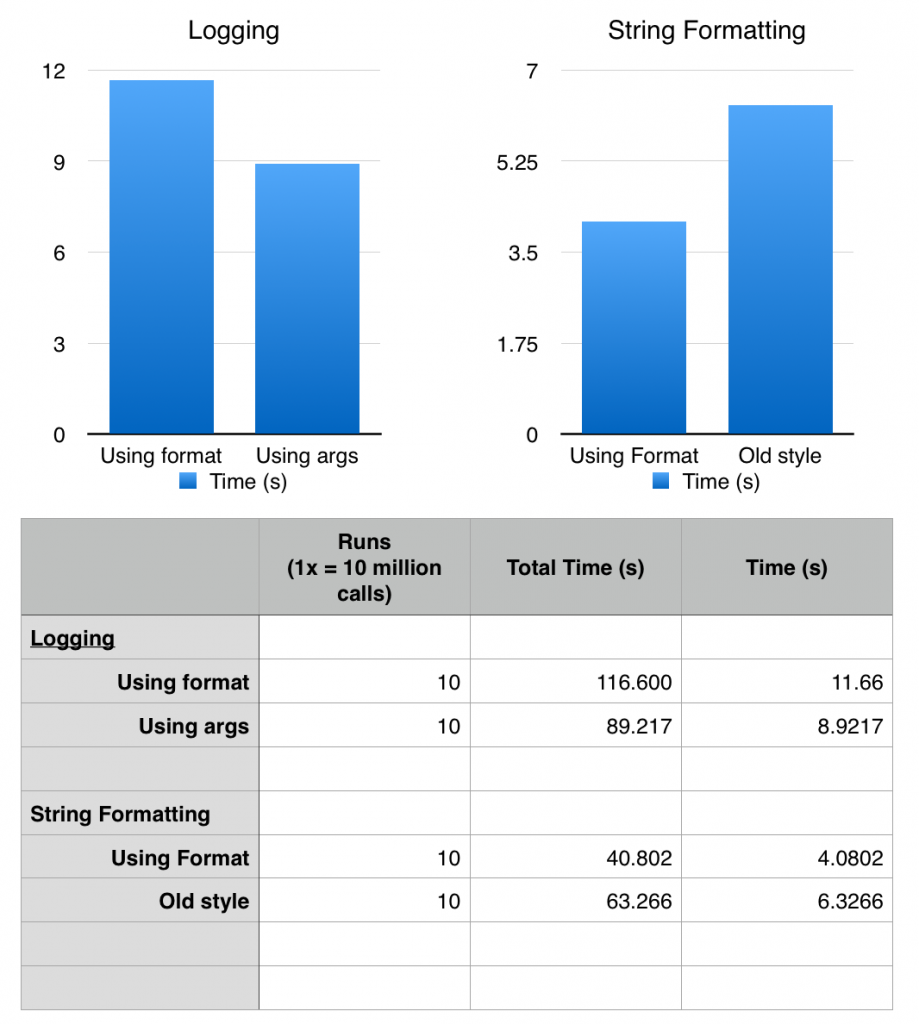
Comparing old style to new style string formatting


In the end

You should use functionality the API gives you.  In most cases, and the case with python, it has been engineered to work, be fast and be maintainable.  For more information on the logging module, check the python docs.  2.7 or 3.5.

Posted by Chad Dotson in Doing Things Better, Programming, Software Engineering, Technology, Tips, 0 comments

Estill Springs Fireworks 2015

These are photos taken at the Estill Springs, TN 2015 Fireworks show.

The Best

The Rest

Posted by Chad Dotson in Photography, 0 comments

PyCharm and Version Control

So, you want to add your PyCharm project files to a VCS but you constantly deal with problems because each of your team members have different names/locations for their project interpreter.  There is a rather simple solution to this problem.  Basically, at the project level, PyCharm only cares about the name of the interpreter, not the location.  Follow these instructions to give your interpreter a name that is consistent across developers and then use that in your project files to fix the issue.

    1. Open PyCharm
    2. Select File >> Settings (or Configure >> Preferences if you don’t have a project open).
    3. Search for the Project Interpreter setting (this will also work if you don’t use the project interpreter in your run configurations).
    4. Hit the little gear box next to the project interpreter then select More.
    5. Select the interpreter from the virtual environment of your choice and hit the edit button.
    6. Now give it a unique name (preferably identifiable and related to your project.
    7. Now, select that unique name as your default project interpreter or your run configurations.
    8. Commit
    9. Make sure each team member does the same.

Now whenever you update or commit, you won’t constantly see changes associated with people selecting their interpreter.

If you want to know more, I definitely recommend reading a thread over at Jetbrains’ Support.

Posted by Chad Dotson in Doing Things Better, Programming, Software Engineering, Tips, 0 comments

DLSR Lightning Trigger 4

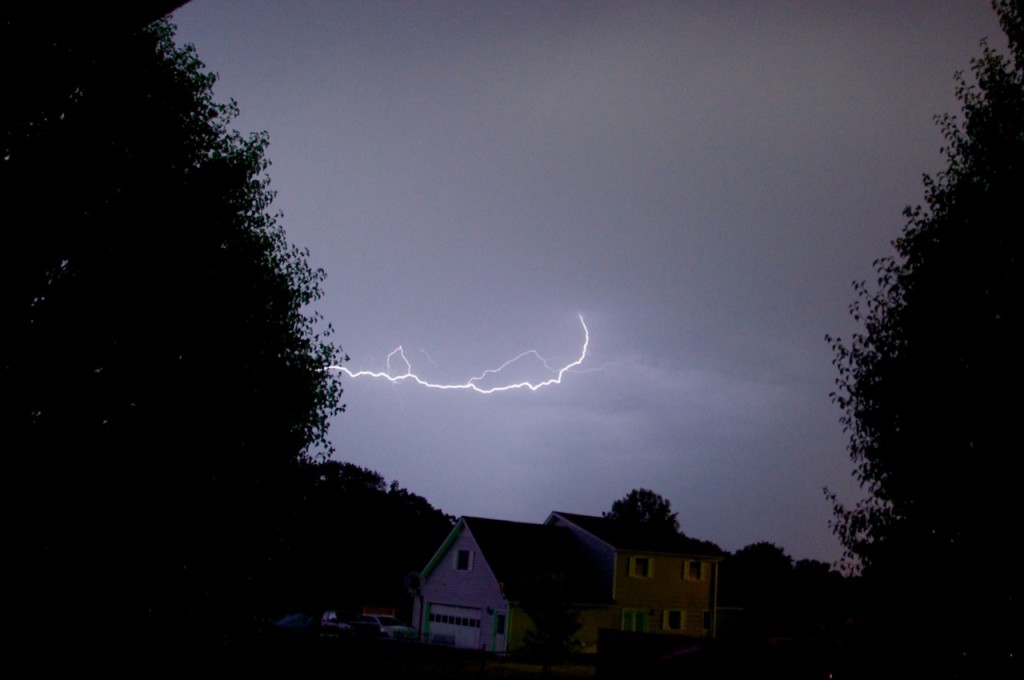
Success again!  This time the lightning trigger managed to capture a good bolt (though not as photogenic as I would have liked).  I ran into trouble again with my camera exiting the “Quick-response remote” release mode.  This caused me to miss more than a few events, but I did find the solution.  Buried in one of the custom settings is a timeout for the remote feature.  It defaults to 1 minute!  I’ve now set it at the max of 15 minutes.  Maybe this has worked some of the kinks out and the next storm will produce some good lightning opportunities.

Posted by Chad Dotson in Hobbies, Photography, Programming, Technology, 0 comments