Key Concepts

Python Logging – Best Practices

The python logging module offers a wide variety of logging options and handlers.  One thing missing from the documentation is when to use each level.

A quick foreword

You really should familiarize yourself with the logging package.  How to create new loggers (I find creating them by module very useful).  There are many ways to configure logging, I tend to like dictConfig from logging.config (but start off with basicConfig form logging).

A Word on Optimal Setups

I prefer to setup my logging with each module having its own logger.  This allows me to configure logging levels at a package and/or module level.  I typically do the following in each module to create a logger.

from logging import getLogger
...
logger = getLogger(__name__)
...

Assuming my package structure consists of the following:

– foo (package)
—– core (module)
—– bar (module)

We can configure varying levels of logging for each element, as seen in the following snippet from a dictConfig.

...
'loggers': { 
    '': { 
        'handlers': ['default'],
        'level': 'INFO',
        'propagate': True
    },
    'foo': { 
        'handlers': ['default'],
        'level': 'WARNING',
        'propagate': True
    },
    'foo.bar': { 
        'handlers': ['default'],
        'level': 'DEBUG',
        'propagate': True
    },
}
...

In this example, the root ( ” ) logger (those not configured by any other settings) reports INFO level and up messages.  With the exception of the bar module, the foo package only reports WARNING level and up messages.  The bar module is set to a more verbose DEBUG level, to show information needed for debugging.

Selecting A Log Message Level

Out of the box, there are six default logging levels recognized by the logging module, most are self-explanatory.  I’ll just make some notes about usage.  (From here on out, I’ll refer to my logging instance as logger.)

For general status messages, you should use logger.info (INFO).  For errors, use either logger.critical (CRITICAL) or logger.error (ERROR).  For all exceptions, use logger.exception (ERROR).  logger.exception will automatically include stack trace information about the exception for you in the log. When you want verbose debugging information, use logging.debug (DEBUG)

In Closing

  • Use the logging module instead of print statements.
  • Always use logger.exception for logging exceptions.
  • Favor logger.debug for verbose log statements.
  • Favor logger.info for most other log statements (with the exception of errors).
  • Don’t forget that each of the logging functions uses C-style formatting.

Posted by Chad Dotson in Doing Things Better, Key Concepts, Programming, Software Engineering, Technology, 0 comments

“On The Job Training” vs “On The Job Learning”

A career in programming consists more of “on the job learning” than “on the job training.”

Training

Training as something someone else teaches you to do.  There may or may not be any real expectation of advancing the concepts covered in the training.  The analogy would be that if you work in a sprocket factory, you are not taught about the design of the sprocket nor any concepts behind the design of sprockets, you are taught how to make sprockets given direction.  Training is limited, it can only take you so far in a programming career.

Learning

Learning is progressive and continual and a critical necessity for a career in programming.  You should spend lots of time learning concepts, principles, and techniques.  Then you should attempt apply and further those ideas.  A good programmer is always learning from their experiences and asking, “How can I do this better?,”  “Have I clearly communicated my intentions?,” and “Did I do a good job?”  Will you ever find that you have done a bad job or written crappy code, most certainly!  I think that realization is a sign of progress.

TLDR; Be a good programmer, don’t stop learning.

Posted by Chad Dotson in Key Concepts, Programming, Software Engineering, 0 comments

Not Invented Here, Not Written By Me, and Reinventing The Wheel

Not invented here and not written by me are both driving factors in reinventing the wheel when developing software.

We limit ourselves if we do not build upon the achievements of others. – Chad Dotson

Not Invented Here

I’m sure everyone has encountered developers that would prefer to implement everything themselves instead of using a library.  An example would be not using jQuery or underscore (or comparable libraries) on a web project.

This is a serious problem for several reasons.

  • It needlessly increases development time.
  • It potentially leads to less robust code and/or increased testing time.
  • It potentially leads to less maintainable code.

I’m not saying that libraries should always be preferred over your own code, but they should be strongly considered.  If you choose to re-implement what a library gives you, you should prepare some defensible reasons for not going with the library.

More: Wikipedia

Not Written by Me

This is a more refined, narrower case of Not Invented Here.  Those developers who don’t want to spend the time or have difficulty understanding code written by others often reimplement code because they view it as the simpler solution.  This is a falsity and they hurt their overall code quality and momentum for it.

Some common things you will hear are:

  • I don’t know what that code does.
  • I would spend a shorter amount of time rewriting it.  (Which is most likely a falsehood.)

The Core of the Issue

As I’ve said, I think the core of the issue is that we find it harder to understand what someone else writes vs what we write ourselves.  We must apply programming best practices and resist the urge to reimplement the past.  To grow, we must push past our tendencies and continue to move forward to bigger and better things.

Posted by Chad Dotson in Doing Things Better, Key Concepts, Programming, Software Engineering, 0 comments

On Software Engineering

Spring

Writing from the patio on a much deserved day off. What a day, sunny and 68 this 3rd day of spring. It sometimes makes it real hard to work inside in a windowless box. It’s been a busy day of a different sort, but dang I could get used to it.

Software Engineering Is Consuming

Software Engineering can and is absolutely consuming work.  The short of it is, we like what we do so we tend to focus a lot of attention on it.  We are problem solvers, designers, learners, and the list goes on.  I am of the philosophy that you should find and do something you like because anything else is a waste.  I guess that philosophy has its pros and its cons.  Is it so bad when your day consists of writing code, solving problems, researching, and learning new things?

Achieving Balance

I guess everyone talks about work/life balance and its true; you must always take time for yourself.  Get outside, do some walking.  It will help clear your head and it is a good stress reliever.  Maybe you’ll come back to the task with some fresh ideas and renewed vigor.  The schedule will always be there.

Personally as of April, I will have been on a diet and exercise plan for 2 years.  I’ve lost a lot and still need to lose more.  One of my biggest problems has been shorting myself on time to maintain my walking and weight lifting.  I seem to always get wrapped up in something.

Having a rewarding hobby is probably a good idea.  I’m not talking about coding a side project (don’t we all seem to have an overabundance of those), I’m talking about something else entirely.  My non-programming hobby is photography.  I don’t get to do it much it seems anymore it seems, but I do find winter a dreary time to take photos.  I did have a major accomplishment in this area last fall.  I officially photographed a wedding.  While I was originally scared to take on such a task, the photos turned out wonderfully.  I took the photo below today.

2015_03_23_Spring_Bradford_Pear

Bradford Pear Blooming Spring 2015


Posted by Chad Dotson in Hobbies, Key Concepts, Photography, Programming, Ramblings, Software Engineering, 0 comments

Make It Easy

Building a successful product is usually complicated business.  With any luck a project will have an automated deployment process.  This however is only part of the equation.  Another significant part would be an automated build process.

Long Term Success

Long term success means making it easy for new people to get started in the weeks/months/years following a project’s startup.  Imagine the following project in two different scenarios.

The project is a large scale application with several dependencies.

Scenario 1 (No automated configuration and build process):

  1. Check out project from source control.
  2. Perform configuration needed for dependencies.
  3. Build / Install each dependency separately.
  4. Perform configuration needed for product build.
  5. Build product.

Scenario 2:

  1. Check out project from source control.
  2. Build product.

Which of those scenarios is more straight-forward and easiest to work with?  It’s pretty easy to see that scenario 2 is the best.

Memory and Documentation

In addition to helping new team members get started,  automated builds can serve as a form of long term memory.

“How do I do that?” becomes “press build.”

“How does that work?” becomes “check the build script.”

Posted by Chad Dotson in Key Concepts, Programming, Software Engineering, 1 comment

Machine Learning and the Curiosity Engine

The Future

As we progress technologically, there is an increased focus on machine learning.  That is a machine that is not necessarily programmed with the algorithm to solve a problem, but one that has been programmed with the ability to take a given set of input, classify it, and generate an answer.  This is achieved via supervised, unsupervised, or reinforced learning techniques.  My background in this field is creating neural nets and I am more that a bit rusty so for more on topic of machine learning see wikipedia.  I believe machine learning to be only half of the equation to achieve true AI.

Achieving True AI

Machine learning still requires a human to create the learning data set, expected results, and training algorithm.  This is an incomplete view of what is necessary to achieve true artificial intelligence.

  • We must teach machines how to learn a new general task using its current capabilities and apply that to future tasks.
  • We must teach machines how to incorporate new capabilities and algorithms into themselves.
  • We must teach machines a process to learn new tasks with little or no user input.
  • Above all, we must teach machines how to be curious.

The Curiosity Engine

As living, breathing creatures it is our curiosity that drives us to learn new things.  It is how we learn to do anything new from walk to drive to fill-in-the-blank.  I believe that Machine Curiosity is critical to the future of AI.  Once we figure it out, the possibilities are endless.  So this raises a good question, how do we teach machines to be curious?  I don’t think that anyone really knows the answer to that question.  Here, however, are some possibilities.

  • Mimicking –  While mimicking is a learning method, maybe it can help with curiosity too.  The machine could analyze behavior, identify behavior that it doesn’t know, then attempt to mimic the behavior.  This could be considered a crude form of machine curiosity by itself.
  • Chaos (random combinations of known abilities) – Another crude form of curiosity. The machine simply pairs capabilities in the attempt to do something new.  This is brute force, and might take along time to create useful abilities.
  • Observation – The machine selects observed capabilities and applies its current capabilities to it in order to learn about the expected results.  The machine would need a way to create new analytical capabilities.
  • …  Many many more methods …
  • A mix of the above – All of the above can be combined into one curiosity engine.  This method has the potential to be the most efficient since it will make intelligent use of all other methods.
Posted by Chad Dotson in Key Concepts, Technology, 0 comments

Comparing Node.js and Python on the Raspberry PI

Picture of my simple led circuit connected to the Pi.

Picture of my simple led circuit connected to the Pi.

Programming on the Raspberry Pi

Python seems to be the more popular language for writing programs on the Raspberry Pi.  However, it is far from the only language: Python, C, C++, Java, and Ruby are some that are automatically supported out of the box.  As it turns out Node.js is also supported.  Perhaps, just based on my preconceptions, I didn’t originally consider JavaScript when interfacing directly with hardware.  The goal of this article is to compare functionally equivalent sample programs written both in Python and JavaScript.


The Goal

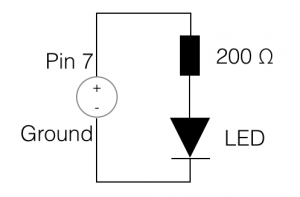
I decided to make the scope of the problem created for this article as small as possible.  Given that the goal will be to create simple circuit diagram consisting of a LED and then to write a program that makes the LED flash for a specified period of time.


Simple LED circuit diagram

Simple LED circuit diagram

Hardware

With the Pi, a circuit that will make a LED flash is relatively simple: Consisting of just a LED and resistor.  I arbitrarily selected pin 7 on the Pi for this build.  I’ve included a diagram of it on this page.


Software

As the goal states, the following two implementations do nothing except toggle an LED at half the specified duration (0.5s) and automatically shutoff after 60 seconds.


Python

Since Python is the more traditional programming language for the Raspberry Pi, let us start with it.  The Rpi.GPIO module I used can be installed via pip.  Before you read the code sample, let me point out some things about the implementation.  Could it have been done simpler given that the problem was just to make the LED flash for a certain amount of time?  Yes, but I wanted to create something of an asynchronous process that could be controlled from outside its execution context.

import RPi.GPIO as GPIO

from threading import Event, Thread, Timer

class ImprovedThread(Thread):
    def __init__(self, *args, **kwargs):
        super(ImprovedThread, self).__init__(*args, **kwargs)
        self._stopEvent = Event()

    def stop(self):
        self._stopEvent.set()

    def is_stopped(self):
        return self._stopEvent.isSet()

    def wait(self, duration):
        self._stopEvent.wait(duration);


class LEDFlasher(ImprovedThread):
    def __init__(self, pin, duration):
        super(LEDFlasher, self).__init__(target=self._flashLED)
        self.setDaemon(True)

        self._pin = pin
        self._duration = duration
        self._state = False

        GPIO.setmode(GPIO.BOARD)
        GPIO.setup(self._pin, GPIO.OUT)

        self.start()

    def _flashLED(self):
        while not self.is_stopped():
            GPIO.output(self._pin, self._state)
            self._state = not self._state
            self.wait(self._duration/2)

flasher = LEDFlasher(7, 0.5)
Timer(60, flasher.stop).start()

flasher.join()

GPIO.cleanup()


JavaScript

I used pi-gpio to interface with the GPIO on the Pi in JavaScript.  It can be installed via npm. It makes use of gpio-admin so that your script doesn’t have to run as sudo.  Follow the installation instructions provided here and it should get you setup.  Note that due to differences int the languages, it was not necessary to thread (web workers) the solution.

var gpio = require("pi-gpio");

function flashLED(pin, duration) {
    return setInterval(function() {
        gpio.open(pin, "output", function(err) {
            gpio.write(pin, 1, function() {
                setTimeout(function() {
                    gpio.write(pin, 0, function(err) {
                        gpio.close(pin);
                    });
                }, duration/2);
            });
        });
    }, duration);
}

var intervalID = flashLED(7, 500);

setTimeout(function() {
    clearInterval(intervalID);
}, 60000);


The Findings – I was surprised

When I started writing the JavaScript side of this article, I was mainly doing it to gain experience working with JavaScript on the Pi.  I did not expect to come out of it vastly preferring it over my python implementation.  I find the Python implementation above to be to wordy and overcomplicated.  It just seems that the amount of code needed to achieve the same results is excessive.  Perhaps this is because of the problem scope and implementation.  The problem posed here was a simple one, where a functional solution is superior to an object-oriented one.  Could the Python code above be rewritten into something a bit more functional? Sure!  Are there problems that an object-oriented Python or JavaScript implementation would be the better solution for?  Definitely.  The lesson to take away: be open to working outside your comfort zone and pick solutions to problems based on their fit for the problem not your comfort level with them.

I’ve created a copy of the code as a Gist that is available here: https://gist.github.com/chaddotson/570501a3e3dcfe8928c8

Posted by Chad Dotson in Key Concepts, Programming, Raspberry Pi, Software Engineering, 8 comments

Knowing When You’ve Wrote Crappy Code

Note: This article was kicked off by one I read over at LosTechies.

We write lots of code, statistically speaking some of it is what we’d deem as “crappy.” If you’re doing things right and progressing in your career and your understanding; your definition of “crappy code” should change over time.  This is very important concept for a good Software Engineer, its one of the ways we get better.  We recognize our past coding mistakes and work to better them.

Dangers of Crappy Code:

  • It could hide technical debt.  “I don’t really know how or why this works, but here it is. Done.”
  • You’ve not taken the time to make what works, right.  This potentially leads to bloated code, duplication, and an overall poor product quality.
  • Is it robust?
  • It is, potentially, not very reusable.
  • Can I hand this code off to someone else and they understand it?

Preventing Crappy Code:

The prospect of writing crappy code should not prevent you from getting a project working.  However, it is very important to make it as right possible before committing the code changes to the repository.

  • Write self-documenting code.  Some developers may scoff at this statement, but self documenting code is very possible in just about any language.  Remember comments are your failure to communicate.
  • Remember to refactor, refactor, and refactor.
  • Ask for the opinion of a peer.  This should be someone you consider qualified enough to give an opinion.
  • Use “TODO” comments so your thought process is not lost and it will serve as a reminder that you must still make something right.  This doesn’t prevent crappy code from making it into a project but it documents its existence.

What To Do When You Find Crappy Code:

For the sake of this topic, lets assume you run across some crappy code 2 years into maintenance of a software product.

  • Identify why it is “crappy.”
  • Does it work or has it unknowingly introduced bugs into the system?
  • Perhaps leave a NOTE comment in the code, especially if it can add insight into the function of the crappy code.
  • Only change the code if it is within the scope of your current task.  Remember that it has worked for 2 years and changing it now could potentially introduce error.  If you do end up changing the code, attempt to make it right before you finish.  Also make sure to update your unit tests.

Are you Ready?  A Simple Test

Review a code base that you wrote 2 years ago.  Did you find “crappy code?”  The answer should almost certainly be a “Yes.”


Posted by Chad Dotson in Doing Things Better, Key Concepts, Programming, Software Engineering, 5 comments