Technology

No Comments – A Failure Twice

Everyone that writes code has encountered or written their fair share of undocumented code.

A failure twice?

I was encouraged to write this article because of something I read about the pinball game that once was included with windows.  According to the article on MSDN, the pinball game was removed due to a bug that should have been fixable.  However, the overall qualify of the code made repair impossible and the game was removed from the distribution.  Two major items can be taken from this:

  • Failure 1: The could should have been self-documenting / few comments required.
  • Failure 2: Code not easily understood should have been commented.

Properly commented code can be tricky!

In college they push you to comment your code while not stressing that over documentation is also bad.  I remember writing programs that had comments on almost every line for assignments.  In the end it doesn’t buy you anything, it just restates the obvious and clutters the solution.  In the workplace, comments and whether or not the code needs them are hit and miss.

Some notes about comments:

  • Many comments are an acknowledgement of your failure to communicate.  Write better self-documenting code.
  • Outdated or wrong comments are worse than no comments.
  • Consider refactoring code that’s not self-documenting.  I find one of the biggest places this can be done is extracting methods from if statements.
  • Choose a good, descriptive names.  I’m a little wordy in my names, but in the end most of my code can almost read like a sentence.

Remember

The code is your best documentation.  Think about what you want to communicate with it and how to be as clear as possible.

Posted by Chad Dotson in Doing Things Better, Programming, Software Engineering, Tips, 0 comments

Node.js vs Python vs PyPy – A Simple Performance Comparison

NQueensGraph

IMPORTANT NOTE: The NodeJS algorithm had a slight discrepancy in it.  See this article for a correction to the performance comparison section of this article.

The Algorithm

Yesterday, I decided to try translate my algorithm for calculating N-Queens to JavaScript.  I’ve implemented the same single-thread, brute force, recursive algorithm in many different languages with the biggest difference being the syntax of the language.  Once I completed the JavaScript Implementation, I ran the program with the latest version of Node.js.

The Findings

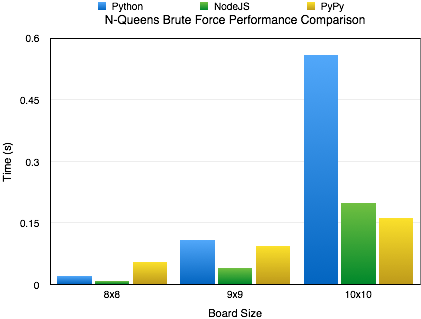
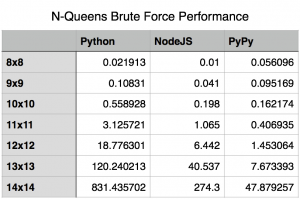
I knew Node was fast but it still surprised me.  As you can see by the included charts, the performance difference between Node.js and out-of-the-box Python is pretty significant.  Its not until the algorithms complexity and recursion depth hit certain limits that Node.js’s performance starts to falter.

Node.js and CPython – What’s The Difference?

You might ask what is behind this performance difference.  The answer is actually pretty simple.  It all boils down to how the code is being executed.  Node.js uses the V8 JavaScript Engine (Wikipedia | Google) written by Google and a part of the Chrome Browser.  V8 includes a just-in-time compiler that compiles the JavaScript to machine code before execution and then continuously optimizes the compiled code.  Python is a bytecode interpreter; meaning that the default interpreter (CPython) doesn’t execute Python scripts directly.  Instead, it first generates a intermediate file that will later be interpreted at runtime.

Ways To Get Better Performance

If you want to use Python, we can overcome the differences between Node.js and vanilla Python by using PyPy, an alternative implementation of Python that includes a just-in-time compiler.  For the algorithm I wrote, you can see a pretty good performance boost over Node.js when using PyPy.

Special Notes

  • I’ve placed my source on GitHub at the following url: https://github.com/chaddotson/puzzles
  • This is just with one type of algorithm, the best solution might and probably does change depending on what type of application you are researching.  For webserver performance, Node.js is slightly better than PyPy running Tornado.
  • This algorithm is a simple brute force algorithm, there are many faster and better ones out there.
  • At a board size of 15, Node.js could no longer run the algorithm due to its maximum recursion limit.
memory_usage
memory_usage_chart

Edit – A Follow-Up

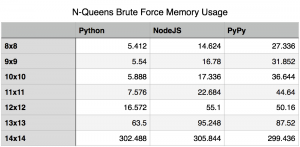
The original focus of this article was shear performance, but I’ve received a question regarding the memory footprint of the 3 methods.  I think that is a very good and valid question.  So, I reran the tests to capture the peak memory utilization by each.  For this test I used “/usr/bin/time -l” to capture the maximum resident set size.  While this isn’t exactly the peak amount of memory utilized by the algorithm, it is sufficiently close to report on.

New Findings

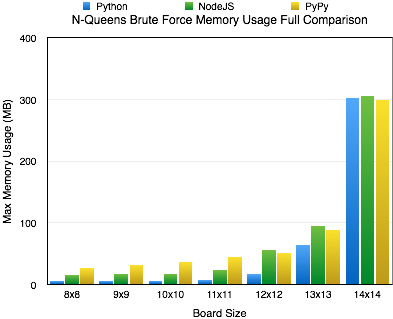
Upon rerunning the tests for capturing memory utilization, I found that for the most part memory utilization contrasts performance.  A higher memory utilization isn’t really unexpected, if you think about it.  Essentially, the jit is sacrificing memory for performance.  In most cases, this isn’t really that bad.  Using a jit is just a cheap way of boosting performance of code written in an interpreted language.  The boost in performance, speed of which it was written and the maintainability of it outweigh memory utilization concerns in many cases.

The Oddity

As you can see, I’ve included a chart covering all the solutions for boards 8×8 to 14×14.  During most increments in board size, the memory utilization seems to increase exponentially; however, when we hit the 14×14 board size we see all the cases level off at relatively the same memory utilization of around 300 MB.  At this time, I really don’t have a good answer for this.  I could certainly speculate, but I’d rather not until I know more.


Posted by Chad Dotson in Programming, Software Engineering, Technology, 28 comments

Knowing When You’ve Wrote Crappy Code

Note: This article was kicked off by one I read over at LosTechies.

We write lots of code, statistically speaking some of it is what we’d deem as “crappy.” If you’re doing things right and progressing in your career and your understanding; your definition of “crappy code” should change over time.  This is very important concept for a good Software Engineer, its one of the ways we get better.  We recognize our past coding mistakes and work to better them.

Dangers of Crappy Code:

  • It could hide technical debt.  “I don’t really know how or why this works, but here it is. Done.”
  • You’ve not taken the time to make what works, right.  This potentially leads to bloated code, duplication, and an overall poor product quality.
  • Is it robust?
  • It is, potentially, not very reusable.
  • Can I hand this code off to someone else and they understand it?

Preventing Crappy Code:

The prospect of writing crappy code should not prevent you from getting a project working.  However, it is very important to make it as right possible before committing the code changes to the repository.

  • Write self-documenting code.  Some developers may scoff at this statement, but self documenting code is very possible in just about any language.  Remember comments are your failure to communicate.
  • Remember to refactor, refactor, and refactor.
  • Ask for the opinion of a peer.  This should be someone you consider qualified enough to give an opinion.
  • Use “TODO” comments so your thought process is not lost and it will serve as a reminder that you must still make something right.  This doesn’t prevent crappy code from making it into a project but it documents its existence.

What To Do When You Find Crappy Code:

For the sake of this topic, lets assume you run across some crappy code 2 years into maintenance of a software product.

  • Identify why it is “crappy.”
  • Does it work or has it unknowingly introduced bugs into the system?
  • Perhaps leave a NOTE comment in the code, especially if it can add insight into the function of the crappy code.
  • Only change the code if it is within the scope of your current task.  Remember that it has worked for 2 years and changing it now could potentially introduce error.  If you do end up changing the code, attempt to make it right before you finish.  Also make sure to update your unit tests.

Are you Ready?  A Simple Test

Review a code base that you wrote 2 years ago.  Did you find “crappy code?”  The answer should almost certainly be a “Yes.”


Posted by Chad Dotson in Doing Things Better, Key Concepts, Programming, Software Engineering, 5 comments

The Flood of Social Media Posts – Whats Wrong, How To Mitigate It, How To Fix It

What’s Wrong

Since its creation, social media has taken off at an exponential rate.  Each day more and more people are creating accounts and contributing to the feed.  Facebook is the service most readily adopted, mainly because of the people already on it.  In the case of Facebook, lets say that the typical user has 200-300 friends and lets say that just a quarter of those (50 of 200) are enthusiastic posters (2-3 posts/day).  That equates to somewhere north of at least 100 posts per day then add to that the posts from your other friends.  Lets make a guess of an overall total of 200 posts/day on just that one social media outlet.  Facebook’s solution to the inundation of posts is the top posts vs recent posts feature.

Skip to the services that I think are the most susceptible to inundating users with content: Twitter and Pinterest.  As a user of Twitter, it seems that I have trouble following over 40 people.  Once upon a time I followed near 90 people and found that useful posts actually got buried in the noise.  Pinterest on the other hand seems to violate all that is good with respect to UI design; it is way to busy and your eyes don’t follow any particular lines.  Liberal use of pinterest’s follow feature can unintentionally muddy the content you see.

Tips On Dealing With It

I think the only way to fix usage of Twitter is to limit the number of people you follow.  Pick high quality, low post rate users.  This will improve the overall quality of content you get.  For Pinterest, limit the number of users or boards you follow.

How To Fix It

How do you fix being inundated with content?  Facebook is certainly trying to fix it via their “Top Posts” feature.  The top posts feature attempts to make guesses about what you want to see based on your interests, what you’ve looked at in the past, and probably other metrics (and controversial stuff such as a recent study).  Even though I don’t care for their current top posts feature I believe Facebook is on the right track.  It all boils down to the ability to listen to everything but only pay attention to what your interested in, even when you may not 100% know yourself.

I think the ultimate “Top Posts” algorithm would take into account the following:

  • What you’ve looked at in the past. (Given)
  • Users would be given preferred tags based on what they view.
  • It would tag each post and each would receive an initial ranking based on the types of posts the user normally make.
  • The initial ranking score given to a user’s posts is a function of how well their posts have done in the past.
  • Each post’s rank is updated in each of its tags as people view them based on their rank in the tag category.

Up Next: I may decide to make a post discussing a theory of how people leave one service and adopt another.

Posted by Chad Dotson in Misc, Ramblings, Tips, 0 comments

Apple’s Magic Mouse – A Software Engineer’s Perspective

Over the past month I’ve been trying to make the transition from my old windows environment to an OSX environment.  Part of the transition involved buying a Magic Mouse.  Apple’s Magic Mouse is definitely a very interesting device.  It is a very accurate mouse with the added capability of a gesture enabled touchpad.  While I like it, the negatives are over powering the positives… at least for me.

  • It seems too small, at least for my hand.
  • While you can scroll by using the integrated trackpad, there is no out of the box concept of a middle click.  I don’t use that when coding, but I sure use it alot when browsing the web.  I was able to get it back by installing the 3rd party tool “BetterTouchTool.”
  • The integrated trackpad is over half of the device.  I find that I mistakenly activate it alot.
  • The single action of the device whether right or left clicking is irritating.  Maybe its just the size of the device that makes this seem irritating.

While I think it maybe great for some people, I’m not sure they are great for everyone.  While I am not going to get rid of mine, I am starting to use my old Microsoft Mouse more often again.  About the only thing I miss about the Magic Mouse is the trackpad scrolling.

Posted by Chad Dotson in Ramblings, Technology, 0 comments

Isolate, Understand, Implement

Isolate, understand, implement: three very important things to remember when adding, modifying or replacing features on a project.  The first step is to isolate the feature.  Hopefully, your project is designed in such a way that once the code is isolated it is in a single place.  The next step is understand.  Meaning understand what the code currently does.  Run the unit tests.  Make sure you know without a doubt why the code works and what the code does.  Also understand any effects that your changes might have.  And finally, implement the new code or changes.  During this phase you’ll modify the unit test set as appropriate, make the necessary changes to the code base, and ensure that the application is stable before pushing it back to your repository.

Posted by Chad Dotson in Doing Things Better, Key Concepts, Programming, Software Engineering, 0 comments

Generating JSON Documents From SQLite Databases In Python

Special Note

This article assumes that you do not wish to use a more sophisticated ORM tool such as SQLAlchemy.

Some Setup

Let’s start with a Q&D sqlite database given the following sql.

create table sample(column1 INTEGER, column2 TEXT, column3 TEXT, column4 REAL);
insert into sample(column2, column2, column3, column4) values(1, "Record 1 Text A", "Record 1 Text B", 3.14159);
insert into sample(column1, column2, column3, column4) values(2, "Record 2 Text A", "Record 2 Text B", 6.28318);
insert into sample(column1, column2, column3, column4) values(3, "Record 3 Text A", "Record 3 Text B", 9.42477);

You can create the sqlite database given the following command.

$ sqlite3 sample.db < sample.sql

Some Different Methods

For this example we want each record returned via the sql select statement to be its on JSON document.  There are several ways of doing this.  All of them solve the problem reasonably well but I was in search of the best way.  In checking python.org, I discovered that the sqlite connection object has an attribute falled row_factory.  This attribute can be modified provide selection results in a more advanced way.

Method 1 – My Preferred Method

From the python docs, we find that they already have a good factory for generating dictionaries.  It is my opinion that this functionality to should be more explicitly enabled in the language.

In this method, we override the row_factory attribute with a callable function that generates the python dictionary from the results.

# https://docs.python.org/2/library/sqlite3.html#sqlite3.Connection.row_factory

import sqlite3

def dict_factory(cursor, row):
    d = {}
    for idx, col in enumerate(cursor.description):
        d[col[0]] = row[idx]
    return d

con = sqlite3.connect(":memory:")
con.row_factory = dict_factory
cur = con.cursor()
cur.execute("select 1 as a")
print cur.fetchone()["a"]

 Method 2 – Almost As Good As Method 1

This method is just about as good as method 1.  Matter of fact, you can get away with this one and be just fine.  Functionally, the methods are almost identical.  With this method, the records can be accessed via index or via column name.  The biggest difference is that unlike method 1, these results don’t have the full functionality of a python dictionary.  For most people, this might be enough.

con = sqlite3.connect(":memory:")
con.row_factory = sqlite3.Row
cur = con.cursor()
cur.execute("select 1 as a")
print cur.fetchone()["a"]

Putting It All Together

The following code snippet will extract a group of dictionaries based on the select statement from the sqlite database and dump it to JSON for display.

The Code

#!/bin/python

import sqlite3

def dict_factory(cursor, row):
    d = {}
    for idx, col in enumerate(cursor.description):
        d[col[0]] = row[idx]
    return d

connection = sqlite3.connect("sample.db")
connection.row_factory = dict_factory

cursor = connection.cursor()

cursor.execute("select * from sample")

# fetch all or one we'll go for all.

results = cursor.fetchall()

print results

connection.close()

 The Results

[
    {
        "column1": 1,
        "column2": "Record 1 Text A",
        "column3": "Record 1 Text B",
        "column4": 3.14159
    },
    {
        "column1": 2,
        "column2": "Record 2 Text A",
        "column3": "Record 2 Text B",
        "column4": 6.28318
    },
    {
        "column1": 3,
        "column2": "Record 3 Text A",
        "column3": "Record 3 Text B",
        "column4": 9.42477
    }
]


Posted by Chad Dotson in Programming, Tips, 3 comments

First Impressions of Rust

Today I finished my first program written in Rust 0.10.  As with my article on Dart earlier this weekend I’m going to rely on Wikipedia for short intro for what Rust is.

The goal of Rust is to be a good language for the creation of large client and server programs that run over the Internet.[13] This has led to a feature set with an emphasis on safety, control of memory layout and concurrency. Performance of safe code is expected to be slower than C++ if performance is the only consideration, but to be comparable to C++ code that manually takes precautions comparable to what the Rust language mandates.[14]
Wikipedia

My first Rust program followed the same pattern that some of my other coding exercises have followed, that is implement an N-Queens puzzle solver.  While not terribly complicated, the puzzle does force an introduction to several important aspects of the language.  Since this was my first take on Rust, I am sure that my implementation isn’t great.

I found Rust to be an interesting language.  One of the more interesting opinions I developed about it was that it really prevents developers from doing something stupid.  That’s probably why it gets high marks for safe, concurrent code.  If I were to compare Rust to any other languages, I would say that it is syntactically similar to Scala and C++.  The strictness of the compiler does make learning the language a little more tedious than some other languages, but nothing that can’t be overcome.  I am probably a little biased on that point too since I’ve been writing a lot of Python lately.

On performance, I did noticed that it was about 60% faster than a architecturally similar python n-queens script I wrote.  I guess that’s not entirely unexpected from a compiled language.  I really want to figure out Rust’s threading capabilities.  That should greatly improve performance of the puzzle even more since it parallelizes well.

Rust has some serious potential and I predict as the language progresses, we will see more apps being written in it and more libraries available for it.  I for one will be continuing to tinker with finer details now that I have this program done.

Links:

Posted by Chad Dotson in Programming, 1 comment